- Created on
Online LLM Tokenizer
- Authors

- Name
- Daniel Demmel
- Occupation
- Software engineer with
21 years of professional
experience
Why tokenizers matter
If you've spent any time working with large language models, you've probably run into tokens. They're the fundamental units that LLMs work with – not quite words, not quite syllables, but something in between. A token might be a whole word like "hello", part of a word like "ing", or even just a single character. The way text gets split into tokens varies between models, and understanding this matters more than you might think. They also quite often contain a space to save on having to encode each space separately, especially as they would be meaningless by themselves.
Token counts directly affect how much you pay for API calls, how much context you can fit into a prompt, and whether your carefully crafted system message leaves any room for the actual conversation. I found myself constantly wondering: "How many tokens is this prompt?" and "Would this be cheaper with a different model?"
The tricky bit is that different models tokenize the same text quite differently. A sentence that takes 50 tokens in GPT-4 might take 45 in Claude or 60 in Llama. Without a way to compare them side-by-side, you're essentially working blind.
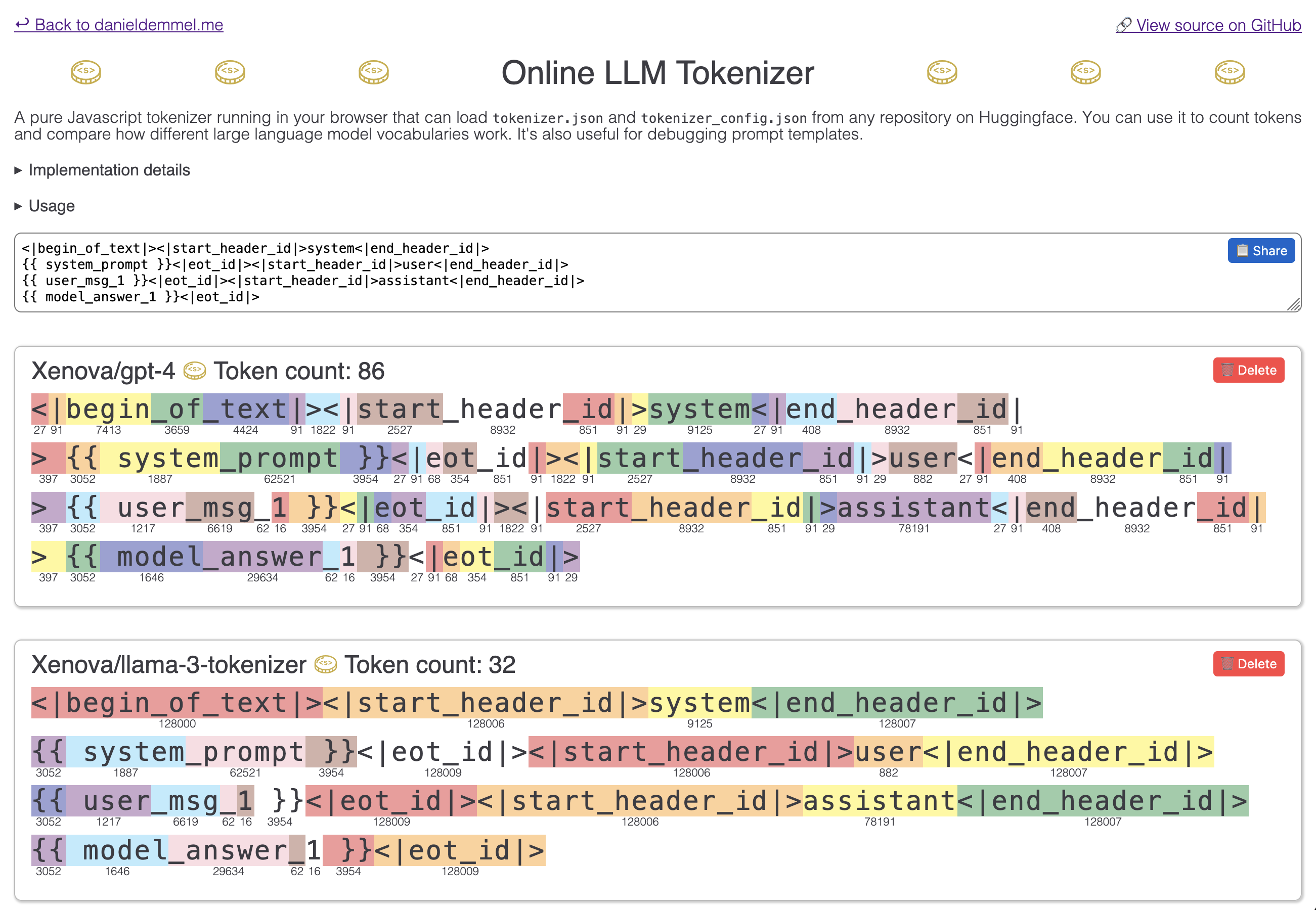
If you're using local models or work with inference directly in any way, you might also need to debug to see if special control tokens in chat templates get encoded correctly, otherwise you might get much worse performance by confusing models.
Building a comparison tool
I wanted something simple: paste some text, see how different models tokenize it, and compare the results instantly. Most existing tools only showed one model at a time, which meant a lot of copying and pasting between browser tabs.
So I built a browser-based tokenizer that loads actual tokenizers directly from HuggingFace and runs them entirely client-side. No server required – everything happens in your browser using transformers.js.
The tool lets you add any tokenizer from HuggingFace by name (like openai/gpt-4 or Xenova/claude-tokenizer), compare multiple models simultaneously, and see exactly how each one breaks down your text. This also makes it possible to keep up with new and obscure models, rather than just having a few popular ones hardcoded.
Each token gets colour-coded so you can visually spot where models differ in their tokenization strategy. I also added shareable URLs so you can send someone a specific piece of text with your chosen models already loaded.
Technical approach
The whole thing runs on vanilla JavaScript with no build process – just HTML, CSS, and JS files that work directly in modern browsers. It uses transformers.js to handle the actual tokenization, which is a JavaScript port of HuggingFace's transformers library.
When you add a model, it fetches the tokenizer files from HuggingFace's CDN and caches them locally. These are not the big, actual LLM weights, just small companion metadata files. Multiple models' tokenizers load in parallel, so the initial startup stays reasonably quick. The input is debounced to prevent excessive re-tokenization while you're still typing.
For the visual display, I used HTML ruby annotations – the same markup that's traditionally used for showing pronunciation guides above Japanese text. It turned out to be perfect for showing token IDs beneath each token segment. The colour cycling (ten colours that rotate through adjacent tokens) makes it much easier to see where one token ends and the next begins, especially for whitespace and punctuation.
The model list persists in localStorage between sessions, and the URL parameters let you share your exact configuration with anyone. It's a small tool, but it scratches an itch I had frequently when working with LLMs.