- Created on
Claude Code Log
- Authors

- Name
- Daniel Demmel
- Occupation
- Software engineer with
21 years of professional
experience
Open Claude Code Log on GitHub
The logs were already there
I started using Claude Code in June 2025 and pretty quickly ran into a problem: once a session grew beyond a certain length, there was no good way to read it back. The terminal interface was fine for the bit you were looking at, but scroll up through a long session and you'd hit the limits of a TUI fast – there was a maximum scrollback, the rendering was basic at best (and fairly often broke completely, leaving a garbled mess), and if the thing you wanted to copy didn't fit on screen, good luck selecting it. The full-screen rendering mode (aka CLAUDE_CODE_NO_FLICKER) only arrived at the end of April 2026, the best part of a year later, and until then it was all decidedly janky.
Which was a shame, because the whole conversation was sitting right there on disk. Claude Code writes every prompt, tool call, file read and token count to JSONL files in ~/.claude/projects/ – it just doesn't give you anything to read them with besides the terminal. A browser, meanwhile, is probably one of the most optimised pieces of software on any computer, and is perfectly happy to render, search and let you select text across a page with thousands of messages on it.
So within a few weeks of starting to use it I was turning those files into HTML. Partly because I kept losing track of what I'd actually done – a long session goes well, you close the terminal, and a week later you're staring at a commit wondering what the reasoning was – and partly because I wanted to go back and find the exact prompt that made something click, so I could do it again.
What it produces
The output is deliberately plain: static HTML pages you can open in any browser, with no server needed, no build step and no framework. Each session becomes its own page, projects get a combined transcript, and the whole archive gets an index with token totals and dates.
That's a real page, generated from a sample of this project's own development – scroll it around, fold the tool calls open, hit / to search. It's regenerated on every docs build, so it's always showing what the current version actually outputs.
A few things I care about in there:
- Tool calls are folded by default. A session with 300 messages is mostly
ReadandEditnoise. You want the conversation, with the option to dig in. - Token usage on every message. Input, output, cache creation, cache read. Cache read numbers turn out to be enormous, which was a bit of an eye-opener.
- Commit SHAs become links. If a
7c2e6f6-shaped token in the transcript is reachable from a remote-tracking branch, it turns into a link to the commit. GitHub, GitLab and Bitbucket work out of the box, self-hosted forges need a URL template.
There's also a timeline view that lays the whole archive out chronologically and lets you zoom in, which is more useful than I expected for answering "what was I doing in July?".
Branches
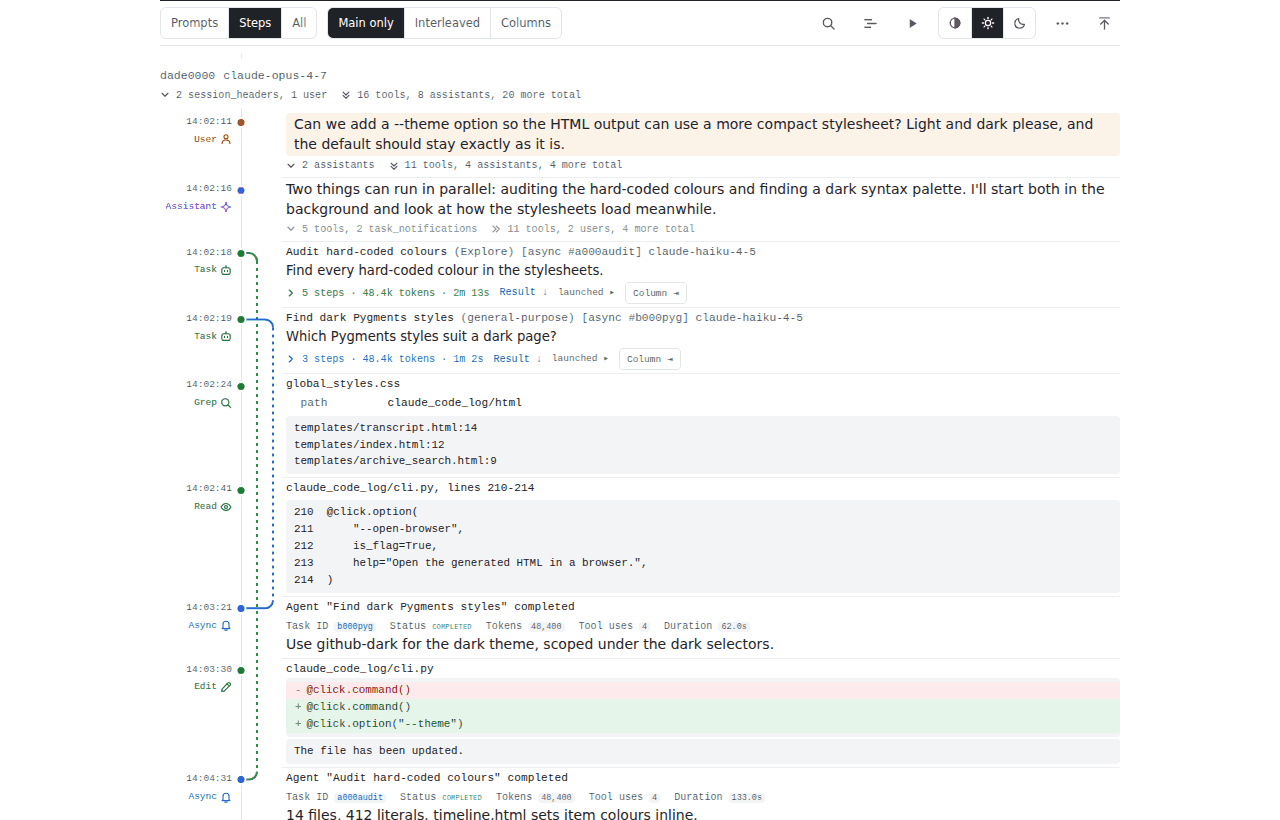
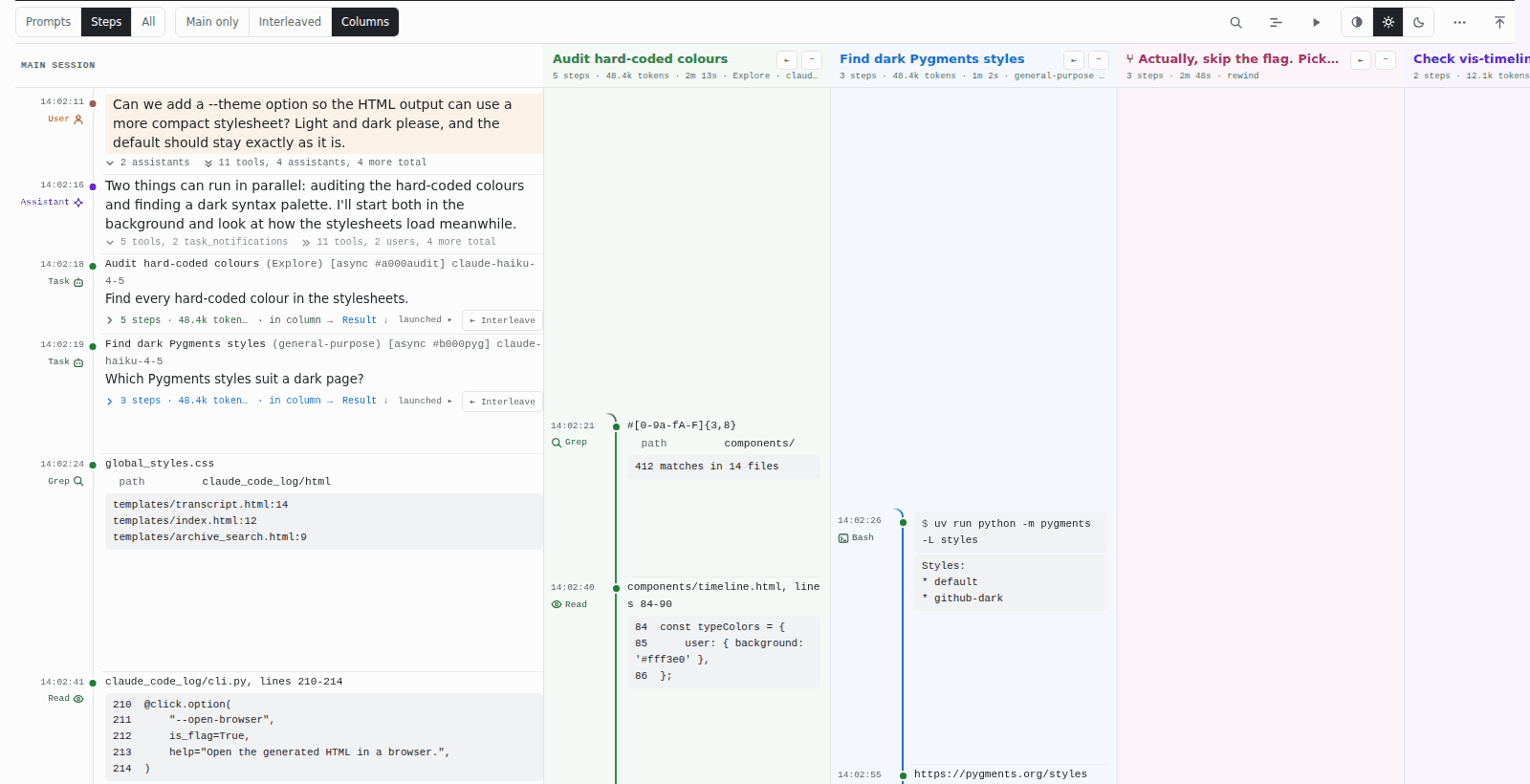
A Claude Code conversation isn't really a straight line – every message points at its parent, so rewinding, resuming or spinning off a sub-agent turns the history into a tree (well, a graph). Back in April Christian Boos rewrote the message ordering to walk those parent links instead of trusting timestamps (#97), and that DAG work is what made it possible for me to draw sub-agents and rewind forks as actual branches in the minimal theme. You can fold them away (Main only, like the screenshot at the top), weave them into the main line at their real times (Interleaved), or open them side by side in Columns:
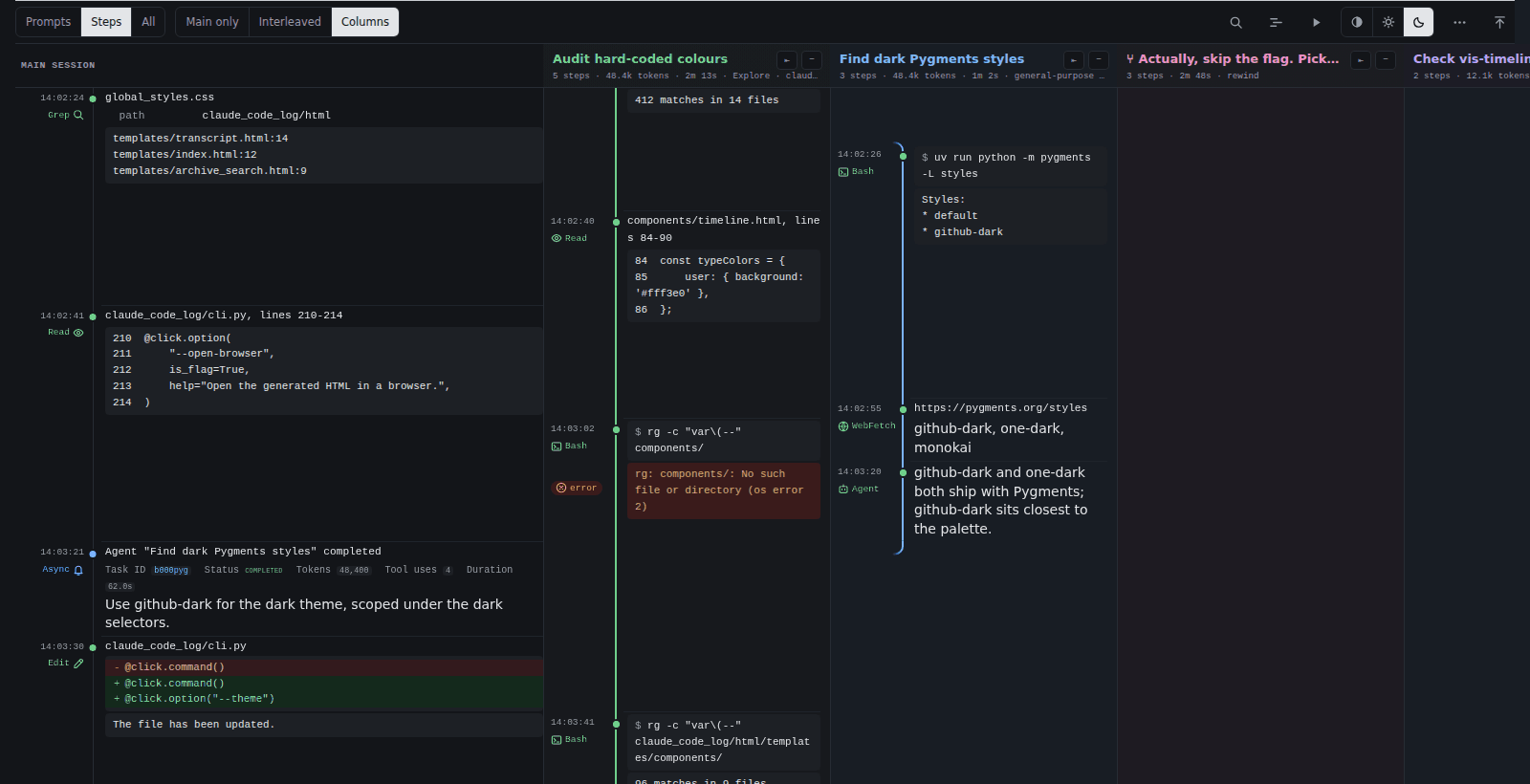
And the same in the dark scheme, where each lane curves back to the main line at the point the agent's result arrives:
The TUI
Generating HTML for everything and then hunting through it got old fast, so there's a terminal UI built with Textual. It lists your sessions with summaries, message counts and token usage, and from there you can press h to open a session as HTML, m for Markdown, or c to resume it in Claude Code.
That last one is the bit I use most. Finding the session you want to continue is genuinely hard once you have a few hundred of them, and claude -r on its own gives you a list of UUIDs and truncated first messages.
Watching and searching
Two of the newer features have changed how I use it day to day.
Watch mode keeps the output current while a session is still running. claude-code-log watch with no arguments watches the project for the directory you're in, converts once, and then regenerates only the session that changed every time Claude Code writes to it – so an editor or an Obsidian vault picks up the change without the whole archive churning. claude-code-log serve --watch does the same for the browser: open a session page and it grows as messages arrive, roughly a second behind the terminal, without a reload throwing away your scroll position or the sections you'd unfolded. A follow button keeps it pinned to the newest message, so it works nicely as a second screen next to a long-running session.
Archive search was the other thing I kept wishing for. Every page has its own search (press /), but that only sees what's on the page. claude-code-log serve adds a search page that queries the SQLite cache directly with FTS5, so you can search every message in every session across every project at once – no more grepping through JSONL for "that thing I did with the …". The generated HTML still works from file:// without the server; the server just gives the page an origin so it can talk to the database.
Feeding sessions back to an LLM
This started as a small feature and turned into one of the more interesting uses. Combining --detail low --format md --compact strips the transcript down to the actual interaction – user prompts, assistant reasoning, and the signals that matter like web searches and subagent delegations – and merges repeated headings so it reads as prose rather than a log.
The result is small enough to hand back to an LLM. I've used it to distil patterns out of my own sessions, work out where I'd been steering badly, and build up notes on what actually works. There's something pleasingly circular about using an agent to analyse transcripts of itself, though I'll admit I haven't yet turned that into anything as systematic as I'd like.
At the other end, --expand-paths mirrors each project under its real on-disk path with one file per session, which drops neatly into an Obsidian vault. Pair it with watch mode and your notes update as the session runs.
Technical approach
It's Python, using Click for the CLI, Pydantic models for the transcript schema (which changes more often than you'd hope), Jinja2 for templates, and wenmode for server-side Markdown rendering. Everything ships as one package on PyPI, so uvx claude-code-log@latest --open-browser gets you from nothing to browsing your archive in about ten seconds (well, plus processing your archive so it depends on how much you slopped out over the months 😅).
The awkward engineering problem is scale. My own archive is a couple of gigabytes of JSONL, and re-parsing all of it on every run would be unusable, so from relatively early on there's been a SQLite cache keyed on file modification times. Getting cache invalidation right took several attempts and at least one embarrassing bug where everything regenerated every single time regardless.
Over July, August and September 2026 I spent a good chunk of time on performance – partly because watch mode was never going to be pleasant if every tick took several seconds. I was after three things that pull against each other a bit: do as little work as possible, use every core when there is work, and never let memory run away. That way it can make the most of a big workstation without falling over on a modest laptop.
- Doing less work. Checking whether the cache was fresh on a 2GB archive turned out to cost seconds, not because of the file stats but because it opened a SQLite connection per file – batching those took TUI launch for one project from 646ms to 12ms. Syntax highlighting and Markdown rendering are memoised, since every message gets rendered twice (once into the combined transcript, once into its session page). When only a few sessions are stale, they're regenerated without loading the whole project. And my favourite: a guard meant to skip unnecessary work could never fire, because the substring it checked for also appears in a CSS rule inlined in every page – so every watch tick re-read 253MB of HTML to change nothing. Fixing that and one other thing took a tick from 7.6s to 1.26s.
- Saturating the CPUs. Rendering is CPU-bound pure Python, so projects fan out over a process pool – largest first, so one huge project doesn't end up finishing on its own at the end – and the pages within a project fan out over workers too. A cold run over a 221MB subset went from 38.7s to 13.2s on four cores.
- Keeping memory bounded. This is the bit that's easy to get wrong. An earlier version of the worker pool could exhaust RAM on a big archive, push the machine into swap and peg every core, which is far worse than just rendering one thing at a time. Now the render caches are bounded by bytes rather than number of entries (and no single huge file can take more than an eighth of the budget), and the number of workers is worked out from how much memory is actually available. If it can't tell, it settles for two.
Rendering is covered by snapshot tests, because the failure mode of a rendering change is subtle and visual rather than an exception. Sadly all most of them were written after I'd already broken something.
More recently there's experimental support for other agents' transcript formats – Codex CLI and Antigravity – which mostly confirmed that everyone has invented their own slightly different shape for the same data.
Why bother
There's a version of this argument that's just about convenience, and that's fine – it is convenient. But these transcripts are also a record of how I work – what I asked for, where I steered badly, what finally did the trick – and for most of the past year the only official way to read them back was the same terminal UI that struggled with them in the first place. The JSONL itself is open enough, it's just not something a human reads.
Turning it into plain HTML and Markdown makes the archive mine in a practical sense rather than just a technical one: it works offline, nothing phones home, it drops into Obsidian or grep, and if Claude Code disappeared tomorrow it would all still open in a browser.
Credits
Built in the open under an MIT licence, forked from Edward Z. Yang's claude-logbook. Christian Boos deserves a special mention as a co-maintainer in all but name – he has more commits than me at this point, including the DAG work behind the branches and the 1.7.0 release, and honestly his contributions are a big part of why I kept coming back to the project to improve it. Thank you! Thanks also to everyone else who found it and made it better – see the contributors and the changelog for the full picture. Documentation lives at daaain.github.io/claude-code-log.
If you try it and something breaks – or you want it to do something it doesn't – issues are very welcome.